页面

显示标签为“vvdi mb tool”的博文。显示所有博文

2019年2月18日星期一

Easiest Way: How to program MB E320 new keys when all keys lost

This is for those looking for the easiest way to program new keys to 2000 Mercedes E320 when all keys are lost. Done with VVDI tools.
Tips and guides through questions and answers.....
Should be able to read password via IR?
I haven't really use the IR very much. When I plugged it into the MB it didn't seem to get any power. There was no red LED on the IR telling me there was power to it. Can you remind me when I may be doing wrong
Is it on the vehicle or on the bench?
On the bench
There's the problem. On the vehicle it will read via ir. Have you got vvdi prog?
Yes.
So your option is to read via prog (solder or use eis adapter) then load file into vvdi mb or put back on vehicle and read in situ. What is the eis part number?
I'm not looking at it at the moment but it started with a 210. It's the 1d49j I believe. Last time I did one of these I had to remove and attached to a mezzanine board for the vvdi prog. I haven't seen an adapter for this. Just for future reference I had no clue you could read with the IR in the car. What is the process for doing that do you still plug in the OBD adapter and the IR reader etc
No need for obd connector. Just use ir straight in the car. It doesn't always read but worth a try. Once you tell me part number I will tell you the most efficient way to tackle this job.
210 545 02 08

Do you have vvdi mb power adapter?
Yes
the little adapter that you plug into the OBD side that's supposed to allow you to do quicker password collection
Then easy job, instructions are within the mb program...

Read eis, then calculate password (I assume you have tokens), then create key. Job done
Do you have a suggestion for where to acquire the wire to connect the OBD and the EIS
Just use any cable and some crimps to get you sorted on this job. It'd be good to make your own few test cables using proper connectors for the future

2018年10月18日星期四

How to use vvdi BE key pro version to change frequency 315MHZ or 433MHZ?

vvdi BE key pro improved version supports changing key frequency between 315Mhz and 433Mhz with VVDI MB tool software or who don’t have this tool, always in this way with PCB resistor.
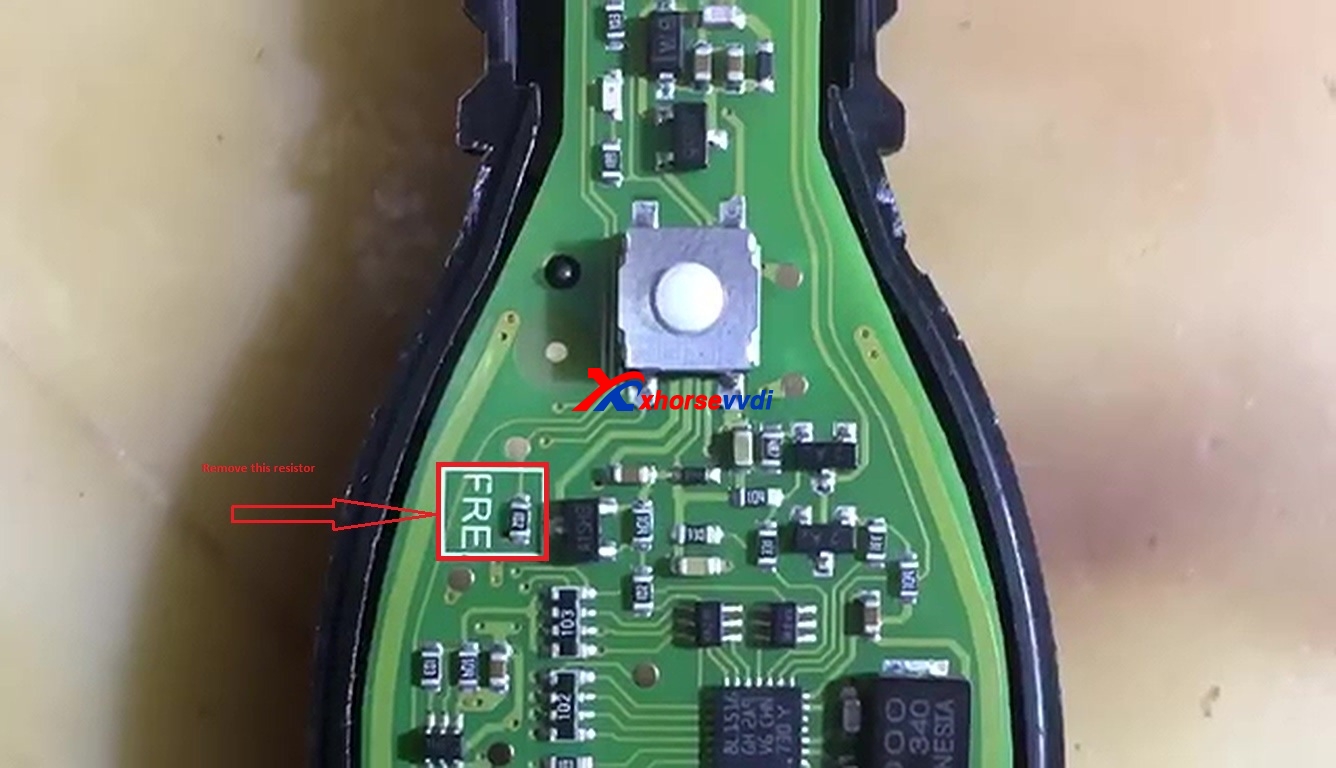
Option 1: change key frequency 315 MHZ or 433MHZ with PCB resistor
This a new VVDI BE Key Pro Improved Version


Put the VVDI BE key into the device programmer of VVDI BGA tool to test the key frequency.
This is a complete new BE key unused.
Test the frequency with VVDI key tool, it is 315MHZ.
Here is a square resistor marked with “FRE”, just remove it.


Put the BE key into the VVDI key tool to read out 433MHZ frequency.
Option 2. change key frequency 315 MHZ or 433MHZ with VVDI MB tool

Open VVDI MB tool, Enter Menu -> Other functions -> reset key frequency.
00:14 – 00:018 : Click on ” Read out key frequency”, the result is 315MHZ.
Put the VVDI BE key on the top of the VVDI KEY TOOL and the key frequency is 315MHZ.
Insert the VVDI BE key into VVDI MB tool.
Choose” 433MHZ” then “Change key frequency”, reset successfully.
Put the VVDI BE key on the top of the VVDI KEY TOOL and read out 433MHZ.93.
Insert the VVDI BE key into VVDI MB tool and you can see ” the key frequency is 433MHZ.93″, click “OK” to confirm.
Explanation to the option “through PCB resistor”. who don’t have VVDI MB tool, then change the key frequency through PCB resistor.

vvdi BE key pro improved version for sale
http://www.chinacardiags.com/wholesale/xhorse-vvdi-be-key-pro-with-smart-key-shell-3-button.html